How to know when Codex is done on a Mac
Codex can work for minutes on one task, and you switch to another window and forget it. Codex has two settings that tell your Mac when it's done, both in ~/.codex/config.toml. Here's how each one works, the catch with one of them, and how to see every Codex session in the notch without setting anything up.
Option 1: a desktop notification from the terminal
Codex's terminal app can send a notification when a turn ends while its window isn't in front. Add this to ~/.codex/config.toml:
[tui]
notifications = true
Instead of true you can list the moments you want, ["agent-turn-complete", "approval-requested"], so you also hear about it when Codex is waiting for your approval. How the notification shows depends on your terminal: some show a macOS banner, others only bounce or badge. notification_method under [tui] switches to a plain terminal bell ("bel") if the banner never comes.
Option 2: run your own command with notify
notify is a line at the top level of config.toml. After each turn, Codex runs the command and adds one argument: a JSON object with "type": "agent-turn-complete", the project folder (cwd), and Codex's last message (last-assistant-message).
- Create
~/.codex/done.sh:#!/bin/bash afplay /System/Library/Sounds/Glass.aiff & osascript -e 'display notification "Codex finished a turn" with title "Codex"' - Make it runnable:
chmod +x ~/.codex/done.sh - Point Codex at it, with the full path, at the top of
config.toml(above any[section]):notify = ["/bin/bash", "/Users/you/.codex/done.sh"]
Replace you with your user name: Codex doesn't expand ~ here.
The catch: there is only one notify. Check for it first with grep '^notify' ~/.codex/config.toml. On my Mac the Codex app had already put its Computer Use helper there, and replacing that line would have turned it off. If a line is there, keep it and have your script do both, or use Option 1 instead.
Option 3: every Codex session in the notch, with Halo
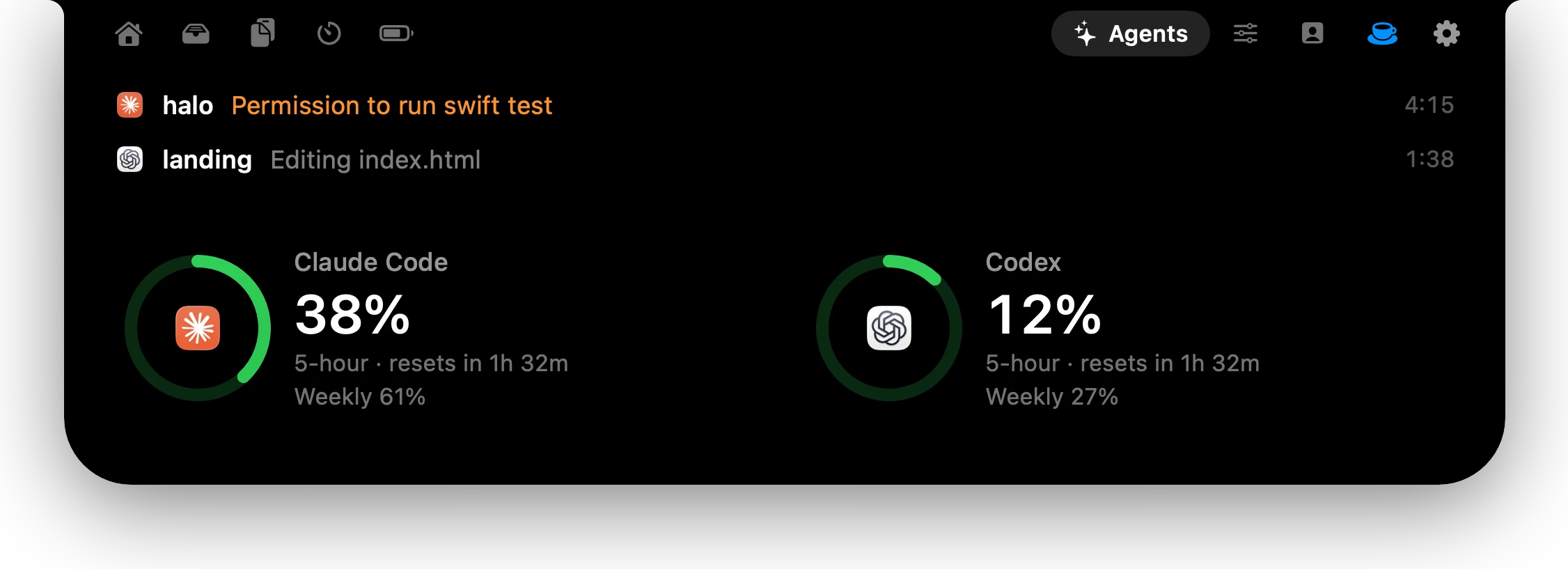
Halo shows each Codex session in your Mac's notch, next to Claude Code and Cursor: working and what it's doing (thinking, running a command, editing), and done with a chime. Codex needs no connecting. Settings › AI Agents just says Works without connecting, and your config.toml is never touched.
That works because Codex writes every session to a file on your Mac, ~/.codex/sessions/YEAR/MONTH/DAY/rollout-….jsonl, one line per event. Halo reads the new lines of files touched in the last 15 minutes, every 3 seconds. A line saying the task started means working, a command or a patch tells it what Codex is doing, and the task-complete line means done. Nothing leaves your Mac.
One honest limit: those files don't record approval requests, so for Codex the notch can't show needs your permission, which it can for Claude Code. Option 1 with approval-requested covers that.
The same files hold Codex's 5-hour and weekly limits, so Halo can also keep a usage meter beside the notch (Settings › AI Agents › Usage meter beside the notch › Codex).
Which one to pick
- One Codex in one terminal: Option 1. Two lines, nothing to install.
- A sound, or your own script: Option 2, after checking for an existing
notify. - Several agents, or Codex next to Claude Code and Cursor: Option 3, so you see which one is done without switching windows.
Questions
Does Codex have a notification when it finishes?
Yes. Set notifications = true under [tui] in ~/.codex/config.toml for a terminal notification, or set notify to a command, and Codex runs it after every turn.
Where is Codex's config file?
~/.codex/config.toml. Top-level settings such as notify go above the first [section]; tui settings go under [tui].
Why doesn't my Codex notify script run?
Codex doesn't expand ~ in notify, so use full paths, and make the script executable with chmod +x. Also check you have only one notify line: a second one, or one added by the Codex app, replaces yours.
Where does Codex save its sessions?
In ~/.codex/sessions, one folder per day, as rollout-*.jsonl files with one JSON line per event. That's what Halo reads to show Codex in the notch.
Can Halo show when Codex needs approval?
Not yet. Codex's session files don't record approval requests, so Halo shows working and done for Codex. Codex's own tui.notifications can notify on approval-requested.
More guides: Know when Claude Code is done · Know when Cursor's agent is done · All guides

Try Halo
Codex, Claude Code and Cursor in your notch, plus notifications, dictation and music. $9.99 one-time, no subscription.
Buy Halo