Best Mac notch apps in 2026
The MacBook notch does nothing on its own. A notch app (people also call them Dynamic Island apps) turns it into a place for music, notifications, files and, lately, your AI agents. There are a lot of them now. Here are the seven worth knowing, what each one is best at, and what it costs.
The short answer
- Free, mostly for music: boring.notch.
- Files, clipboard and extensions, with a trial: Droppy.
- Notifications from any app, an external monitor, 3 Macs per license: Halo.
- The smoothest iPhone-style animations: Alcove.
- You already pay for Setapp: NotchNook.
- You only want to watch AI coding agents: Vibe Island.
Compared
| App | Price | No notch? | Notifications from any app | AI agent status |
|---|---|---|---|---|
| Halo | $9.99 once, 3 Macs | Yes | Yes | Claude Code, Codex, Cursor |
| Droppy | $9.99 once, 2 Macs | Yes | Not listed | Yes, as an extension |
| Alcove | $13.99 | Not mentioned | Yes | Not listed |
| NotchNook | $25 once or $3/month | Yes | Not listed | Not listed |
| DynamicLake | From $13.99 once | Yes | Messages, WhatsApp, Telegram, Slack, Mail | Not listed |
| boring.notch | Free, open source | Not listed | On its roadmap | Not listed |
| Vibe Island | $19.99 once | Not listed | No (agents only) | Yes, the most tools |
"Not listed" means the app's own site doesn't mention it, not that it's definitely missing.
Halo
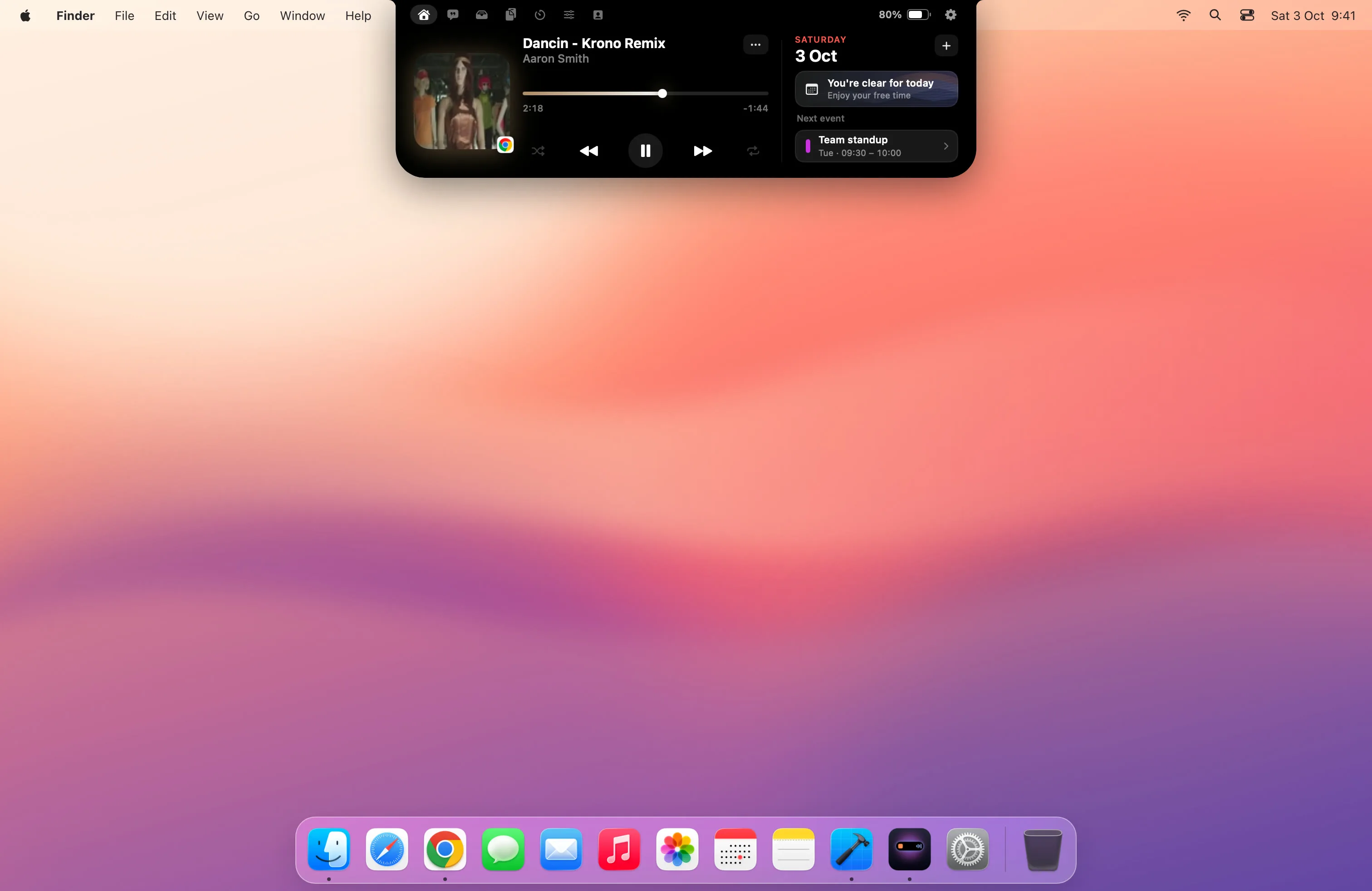
Halo is the one I make. It puts a banner from any app in the notch instead of the top-right corner, with a switch per app. Hold Fn and talk to type into any app, using Apple's speech recognition. A small face called Buddy shows when Claude Code, Codex or Cursor is working, needs you or is done. It also controls an external monitor's brightness, contrast and input over DDC/CI, which macOS can't do on its own. Plus the usual: now playing with synced lyrics, calendar with one-click Join for Zoom, Meet and Teams, a file shelf with AirDrop, timers and batteries.
Good to know: $9.99 once for up to 3 Macs, macOS 15 or later. There's no free trial, and it isn't notarized by Apple yet, so the first launch needs Open Anyway in System Settings › Privacy & Security.
Droppy
Droppy is the closest to Halo, and the strongest pick if you move a lot of files. Its tray can zip, convert and compress, and it adds clipboard history, music with synced lyrics, on-device dictation, a calendar with one-click Join, and 41 free extensions, one of which follows Claude, Codex, Cursor and Antigravity. It works on Macs without a notch. Halo vs Droppy, side by side.
Good to know: $9.99 once for 2 Macs, with lower prices in many countries. macOS 14 or later, a 3-day free trial and a 14-day refund.
Alcove
Alcove is known for how it feels: smooth, iPhone-like animations. It shows notifications in the island, customizable HUDs and lock screen widgets.
Good to know: $13.99 on its site, macOS 15 or later. Its site doesn't mention Macs without a notch or external monitors.
NotchNook
NotchNook is one of the oldest and most widely known. It's a widget area in the notch with now playing, a file shelf and Shortcuts support, and it draws an artificial notch on screens without one.
Good to know: $25 once for 5 Macs or $3 a month for 2, and it's included in Setapp.
DynamicLake
DynamicLake is for tinkerers: plugins, a weather view, an app switcher, a file shelf with share links, and notifications from Messages, WhatsApp, Telegram, Slack and Mail. It works on Macs without a notch.
Good to know: from $13.99 once (name your price on Gumroad), macOS 14 or later, 14-day money-back guarantee.
boring.notch
boring.notch is the best free option. It's open source and covers now playing with a visualizer, calendar and Reminders, a file shelf with AirDrop and a camera mirror. Notifications from any app are on its roadmap.
Good to know: free (GPL-3.0), macOS 14 or later, not notarized, so it also needs Open Anyway once.
Vibe Island
Vibe Island isn't a general notch app: it's built only for AI coding agents, with the widest tool support and sound alerts for each event. If agents are all you want in the notch, it's the focused choice. If you also want music and notifications, Halo and Droppy cover agents alongside everything else.
Good to know: $19.99 once for 1 Mac, with a year of updates. Built for Apple silicon.
What 1,744 bug reports say goes wrong
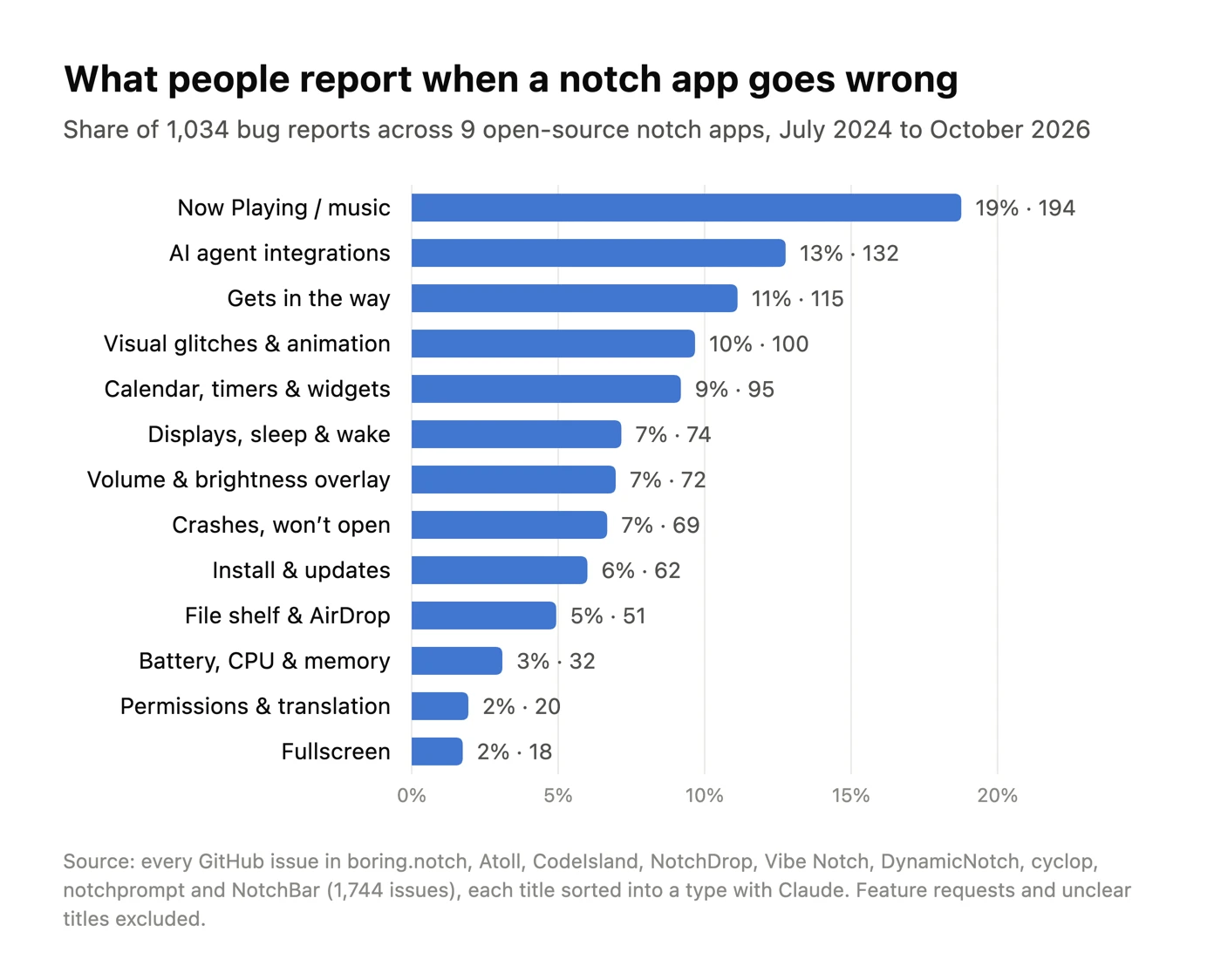
Feature lists don't tell you what it's like to live with one of these apps. Bug reports do. I pulled every GitHub issue from 9 open-source notch apps, including boring.notch and Atoll (1,744 issues, July 2024 to October 2026), and had Claude sort each title into a type of complaint. Halo isn't in this data: it's closed source, so its bug reports aren't public.
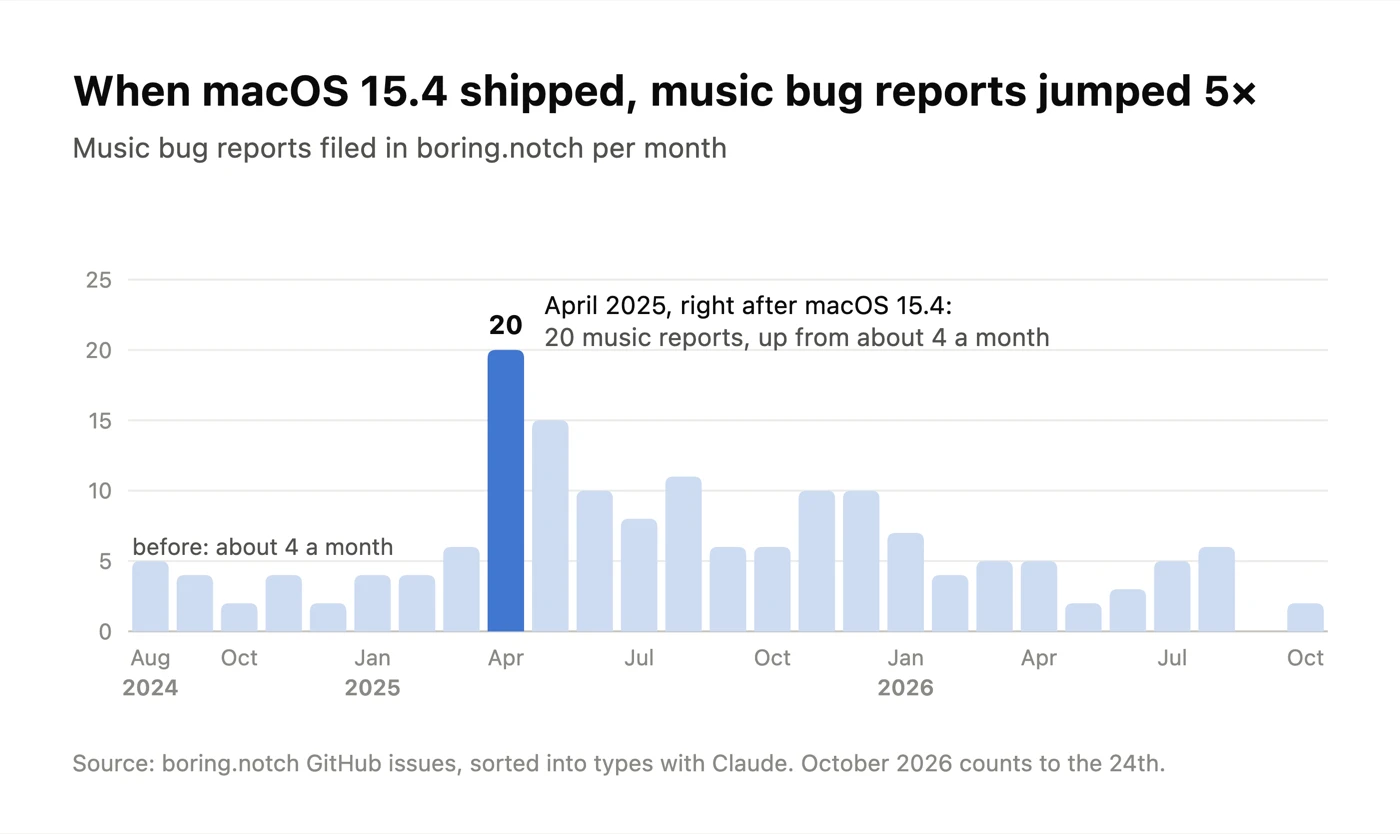
- Music breaks after macOS updates. 19% of all bug reports, the biggest group. In boring.notch, music reports went from about 4 a month to 20 right after macOS 15.4 shipped, because notch apps read what's playing through a private Apple framework.
- The app gets in the way. 11%: covering menu bar icons, opening when you only wanted to reach a browser tab, turning a feature back on after you switched it off.
- It looks slightly off. 10%: an island that doesn't match the real notch shape, a gap above it, an animation people asked to turn off.
- Second screens and sleep. 7%: the island floating in the middle of the screen after plugging in a monitor or waking the Mac.
- Battery and memory. Only 3%, but the worst ones: a memory leak that grew to about 64 GB overnight, a 60 GB cache after three months.
What this means when you pick one: try it with your external monitor plugged in, put the Mac to sleep overnight, check that the off switch really turns a feature off, and look at its CPU in Activity Monitor with nothing playing. Almost nobody quits a notch app over a missing feature. The full study, with the Reddit side: I studied 1,744 bug reports from Mac notch apps.
How to choose
- Decide what you'd look at most. Music only? Start free with boring.notch. Messages? Pick an app that shows notifications from any app. Agents? Halo, Droppy or Vibe Island.
- Check your screens. If you use an external monitor or a Mac without a notch, rule out apps that don't mention it.
- Compare the real price. One-time and subscription prices look closer than they are after a year.
- Try before you settle. Droppy and Alcove have trials; boring.notch is free; Halo is $9.99 with no trial.
Questions
What is the best Dynamic Island app for Mac?
It depends on what you want in the notch. boring.notch is the best free one for music. Droppy and Halo are $9.99 once, work on Macs without a notch and both show AI agent status; Droppy is strongest on files and extensions, Halo on notifications from any app and external monitor control. Alcove is the most polished for animations. NotchNook suits Setapp subscribers.
Is there a free Dynamic Island app for Mac?
Yes. boring.notch is free and open source (GPL-3.0). It covers music, calendar, a file shelf and HUDs, but not notifications from any app.
Do Dynamic Island apps work on Macs without a notch?
Some do. Halo, Droppy, NotchNook and DynamicLake draw an island at the top of screens without a notch, including external monitors. Alcove's site doesn't mention it.
Which notch app shows Claude Code or Codex status?
Halo shows Claude Code, Codex and Cursor sessions in the notch. Droppy has an Agents extension for Claude, Codex, Cursor and Antigravity. Vibe Island is built only for AI agents and supports the most tools, at $19.99.
Are notch apps safe?
The ones here run locally. Most need Accessibility access to read media and banners. Check whether an app is notarized by Apple: Halo and boring.notch aren't yet, so macOS asks you to click Open Anyway once.
What are the most common problems with Mac notch apps?
In 1,744 GitHub issues from 9 open-source notch apps, the biggest group (19%) is music that stops working, often after a macOS update. Next come the app getting in the way of the menu bar (11%), visual glitches (10%) and trouble with external monitors or sleep (7%). Battery and memory problems are rare (3%) but severe.
Sources
- Droppy, checked 20 October 2026
- Alcove, checked 20 October 2026
- Vibe Island, checked 20 October 2026
- DynamicLake and its Gumroad listing, checked 8 October 2026
- boring.notch on GitHub, checked 8 October 2026
- NotchNook and Setapp, checked 4 October 2026
- Bug-report data: GitHub issues of boring.notch, Atoll, CodeIsland, NotchDrop, Vibe Notch, DynamicNotch, cyclop, notchprompt and NotchBar, pulled 25 October 2026
- Side-by-side pages: Halo vs NotchNook, Halo vs Alcove, Halo vs DynamicLake, Halo vs boring.notch
Try Halo
Dynamic Island for your Mac, notch or not. $9.99 one-time, no subscription.
Buy Halo