Halo › Changelog

What's new in Halo

Every version, what it added and what it fixed. Updates are free for everyone who bought Halo.

Stable

Halo 3.0

3.0 (230)
Answer your coding agents from the notch, and a new look for everything.

What's new:

New features

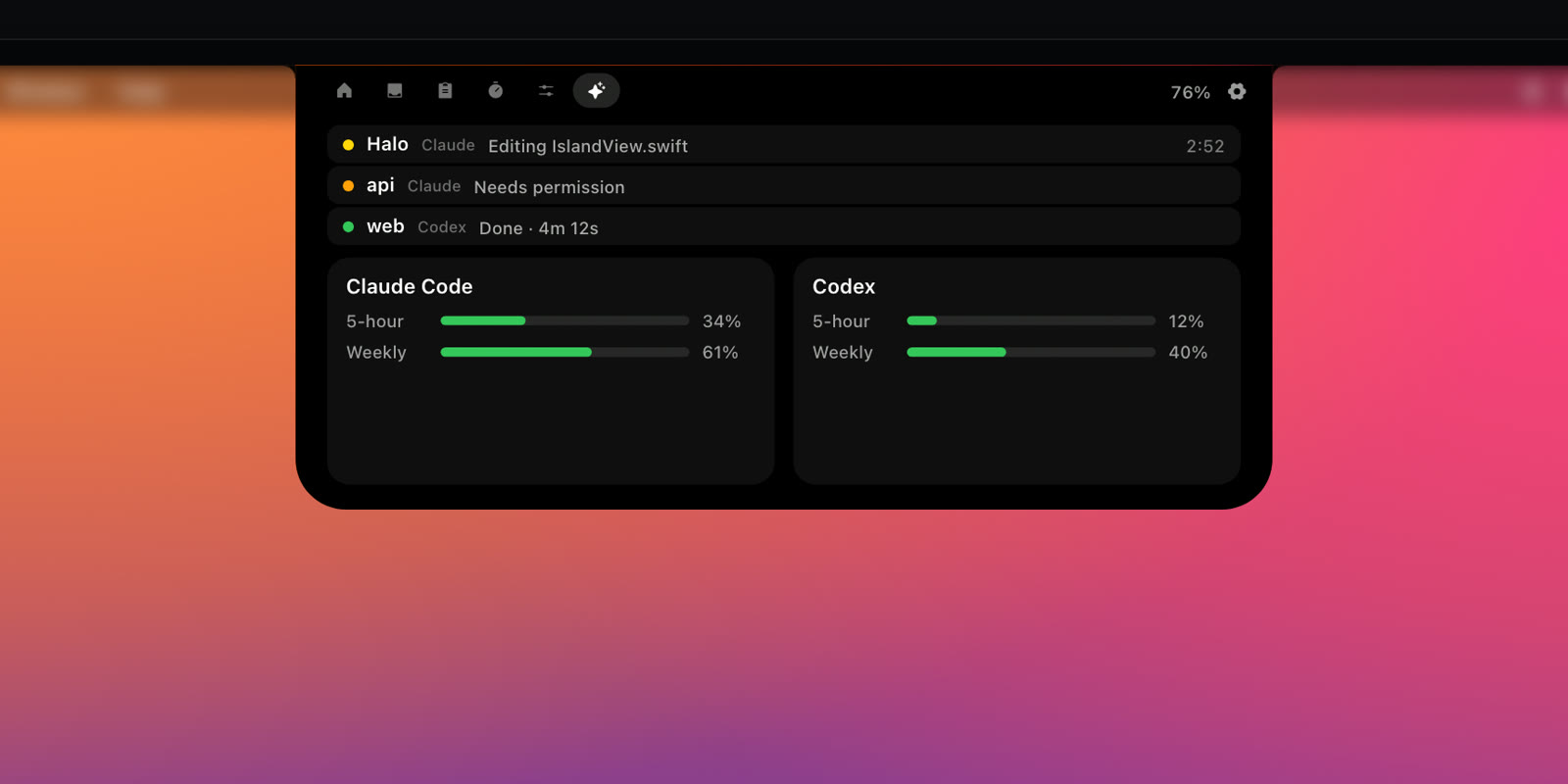
  • Answer Claude Code, Codex and OpenCode right from the notch: Allow, Deny or Always for a permission, pick or type an answer to a question, approve a plan. Claude Code and OpenCode keep their own prompt too, so you can answer in either place.
  • When an agent finishes a longer task, a banner says what it did, how long it took and how many lines changed. Tap it to jump back to the terminal.
  • The Agents tab shows the file an agent is editing and the lines it changed (+48 −12). Usage shows two rings, the 5-hour and the weekly limit, and the big number is the one that runs out first, in orange and then red as it gets close. The ring in the notch follows it too.
  • A Write or Edit card shows the change itself: the file's first lines, or the removed lines in red and the added ones in green. Long plans scroll, so you can read every step before you approve.
  • Activities in circles: a running agent, a download, the meeting you're in and keep-awake ride in small circles beside the notch, so the notch keeps your music. Settings › Look & Displays.
  • OpenCode and Gemini CLI in the notch, and Codex questions show as waiting for you.
  • Notes: a scratchpad tab you can type into without leaving the app you're in.
  • Clipboard cards: filters for text, links, colours, images and files, search, and pins that stay first.
  • Convert images (PNG, JPEG, HEIC, TIFF, WebP, PDF) and text files (plain text, Markdown, Rich Text, HTML, Word, PDF) from the shelf or the clipboard.
  • A minute before a meeting, the banner opens your camera mirror with a Join button, so you can check your camera first.
  • A new design: tiles in the open card, bigger type, Live Activity style cards and banners, a Settings window cut to nine pages, and smoother motion. Clearer Liquid Glass with Tint and Frost controls, Classic or Floating, hover or click to open, and a Fast animation option. No more white glow on hover.

Bug fixes

  • A question you answer in the terminal now closes its card in the notch.
  • If an agent quits or crashes while it waits for you, its card closes on its own instead of staying for up to an hour.
  • A click that lands just as a card appears no longer answers it by accident.
  • Long videos show their full time (1:38:20) instead of cutting it off.
  • Every new line of text is translated into all eight languages.
Stable

Halo 2.1.5

2.1.5 (218)

Usage counts move to my own analytics server.

What's new:

Bug fixes

  • If you share anonymous usage, the counts now go to Pulse, analytics I run on my own server, instead of Umami. The same counts as before, nothing new: still off unless you turn it on, never your name, files or what you listen to.
Stable

Halo 2.1.4

2.1.4 (207)

Two fixes from a user's photos: one banner at a time, and menus you can reach.

What's new:

Bug fixes

  • macOS's banner and the island no longer show the same notification at once. It could happen when several banners came in together.
  • Menus right beside the notch, like Xcode's Window menu, can be hovered and clicked. The island no longer grows under the cursor there, and its timer, call and agent wings step aside like music does.
Stable

Halo 2.1.3

2.1.3 (202)

A smoother handoff for notifications, thanks to a report from a Spanish-speaking user.

What's new:

Bug fixes

  • macOS's own banner no longer blinks on screen a moment before a notification leaves the island.
Stable

Halo 2.1.2

2.1.2 (199)

Halo works with the Halo + Shedi bundle.

What's new:

New features

  • A Halo + Shedi bundle key unlocks Halo, and the same key unlocks Shedi. One key, both apps.
Stable

Halo 2.1.1

2.1.1 (191)

Halo speaks your language everywhere, thanks to a report from a French customer.

What's new:

Bug fixes

  • The calendar card, the timer, the music menu, AI usage, battery and device names, and VoiceOver now follow your language. Some of them stayed in English.
  • French uses one tone throughout, and Italian, Uzbek and the rest got a consistency pass.
Stable

Halo 2.1.0

2.1.0 (187)

Halo gets out of your way: the song title under the notch, room for the menu bar, and the displays you choose.

What's new:

New features

  • Under the notch: the song title, or the lyric being sung, while music plays. Songs without lyrics show their title. Settings › Music.
  • Option-click the island and it steps aside for a minute, so you can click whatever it covers in the menu bar. Banners and agent alerts still show. It's in the right-click menu too.
  • Show Halo on › Displays I choose: switch each display on or off. Halo remembers them through unplugging, docking and KVM switches, and uses the menu bar's display if every one you chose is gone.

Refinements

  • Displays without a notch: a Corners slider for the closed island, and a Shadow switch for the floating style.
  • The floating island's Height slider starts at its real minimum, 30 pt.
  • Earbuds that aren't AirPods show an earbuds icon in Batteries.

Bug fixes

  • Incoming calls keep macOS's own banner, so Accept and Decline are always there. A call from your iPhone could show up as "FACETIME_NOTIFICATION" instead.
  • Batteries: the rings and the charging badge are no longer cut off at the top.
Stable

Halo 2.0.4

2.0.4 (171)

Your meetings in the notch, and links for Shortcuts.

What's new:

New features

  • Calendar tab: today and tomorrow, event by event, with a countdown, a Join button for Zoom, Meet, Teams, Webex and FaceTime links, and a banner a minute before each meeting.
  • Google and Outlook calendars in one click: Halo opens macOS's Internet Accounts, macOS signs you in, and Halo never sees your login.
  • On a call, the island shows the call's app: click it to get back to the meeting from anywhere. A green camera means you're on video.
  • halo:// links for Shortcuts, Terminal and scripts: show a banner, start a timer, keep your Mac awake, add to the Shelf or open a tab. Settings › Automation has Try It and Copy Link for each one.
  • When your disk runs low, the notch tells you, at the level you choose in Settings (5 to 100 GB). A tap shows what's using the space, or opens Shedi if you have it.

Refinements

  • Settings are grouped by feature: Music, AI Agents, Calendar & Calls, Shelf & Clipboard, Battery & Storage and Automation.
  • Lyrics under the notch can be turned on or off for each music app.
  • Your week shows this week so far while last week is still empty.
  • The side island has a two-row header with evenly spread tabs, and usage as compact bars.

Bug fixes

  • Tabs to the right of the notch no longer slide under it.
Stable

Halo 2.0.3

2.0.3 (148)

Everything in this update was asked for by people who bought Halo. Thank you.

What's new:

New features

  • Cursor: connect it in Settings › Island Tabs and the notch shows when Cursor's agent is working, has a question, or is done, next to Claude Code and Codex.
  • On a call, click the time in the closed island to mute or unmute your microphone.
  • A camera button in Controls during calls opens macOS's own effects: Portrait, Studio Light and backgrounds.
  • Timer: a Long break, next to Focus and Break.
  • When an update is ready, Halo tells you in the notch, even if you've hidden its menu bar icon.

Refinements

  • Lyrics under the notch can skip music playing in a browser, and a one-line lyric now sits centred.
  • New setting: a soft glow in the artwork's colour while music plays.
  • Hovering a call opens Controls, where its mute button is.
  • The timer's ruler ends at three hours, the longest it sets, and has more room under the mode buttons.

Bug fixes

  • The Claude Code usage meter no longer steps backwards when two sessions are open.
Stable

Halo 2.0.2

2.0.2 (142)

The three things people noticed most in Halo's first week.

What's new:

Refinements

  • Halo opens when your cursor stops on it, not when it passes over the notch on the way to a menu bar icon.
  • Reach for a menu bar icon beside the notch and Buddy or the music player steps aside, so the icons under it are clickable.
  • The closed island glows softly under the cursor, so you can see it on a black wallpaper.
  • The lyric line under the notch has more room and wraps long lines instead of shrinking them.
Stable

Halo 2.0.1

2.0.1 (129)

License keys, checked quietly in the background.

What's new:

New features

  • New installs ask for the license key when Halo first opens.

Refinements

  • Halo checks your license key with Lemon Squeezy once a week, and keeps working offline for two weeks.
  • If you already use Halo, nothing changes.
Stable

Halo 2.0

2.0.0

The biggest Halo yet: notifications, dictation and a little face called Buddy.

Halo 2.0 in a MacBook notch: notifications, dictation, Buddy and music

What's new:

New features

  • Notifications in the notch: messages from any app arrive in the island instead of a banner in the corner. Click one to open the app, and choose which apps can reach the notch.
  • Dictation: hold Fn, talk, let go, and your words are typed wherever the cursor is, in any app. Apple's recognition runs on your Mac once macOS has downloaded your language; or use Whisper with your own Groq key.
  • Halo Buddy: a little face in your notch that follows your cursor, naps when you're away and shows how your AI agents are doing.
  • Calls: see which app has your microphone, and for how long.
  • Eight languages: English, Español, Deutsch, Français, Italiano, Português, Русский and Oʻzbekcha.

Refinements

  • Redesigned: a Home like Now Playing on iPhone, usage limits as rings, smoother motion, a new welcome and a new icon.
  • Right-click the notch for Settings, Hide and Quit.

Bug fixes

  • Agent status, Now Playing and the license each got a round of fixes from a full audit.
  • Paste works in Settings fields.
Stable

Halo 1.5

1.5.0

Your AI agents in the notch, and a Liquid Glass redesign for macOS 26.

Halo's Agents tab: Claude Code and Codex sessions with their status and usage limits

What's new:

New features

  • See what Claude Code and Codex are doing without switching windows: working, waiting for you, done or failed.
  • A sound and an orange hand when an agent needs your permission, asks a question or has a plan ready.
  • The Agents tab lists every session with its live status. Click one to jump to its terminal.

Refinements

  • Liquid Glass: the open island and everything in it is glass. The closed notch stays black, like a real notch.
  • Smoother motion, and tabs slide in from the side you move toward.

Bug fixes

  • No more flash of the island when swiping between fullscreen apps.
  • The floating island's position can be moved up or down.
Stable

Halo 1.4

1.4.0 – 1.4.4

A focus timer, your AI usage limits, and islands on the side of the screen.

What's new:

New features

  • Focus and Break timer, set by dragging a ruler.
  • Claude Code and Codex usage limits in the island, and pinned beside the notch if you like.
  • Connect Claude Code in one click, and your own status line keeps working.
  • The island can live on the left or right edge of the screen.

Refinements

  • Settings redesigned to feel like System Settings.
Stable

Halo 1.3

1.3.0

Batteries, and a calmer tab bar.

What's new:

New features

  • Batteries tab: your Mac, AirPods and other devices in one place.

Refinements

  • The tab bar clears the notch, and every tab is the same width.
Stable

Halo 1.1

1.1.0 – 1.2.0

Lyrics, calls and a camera mirror.

What's new:

New features

  • Synced lyrics for the song that's playing.
  • See when an app is using your microphone.
  • A camera mirror, for a quick check before a call.
  • New downloads and screenshots land on the shelf.

Refinements

  • Your next event shows a short day label, so the time always fits.
Stable

Halo 1.0

1.0.0

The first Halo: your Mac's notch, alive.

What's new:

New features

  • Now Playing from any app, with artwork and controls.
  • Volume and brightness in the notch, instead of the big macOS overlay.
  • Charging, timers, a file shelf and clipboard history.
  • Brightness keys that work on external monitors (DDC), on Apple silicon.
  • On screens without a notch, Halo draws its own island at the top.